Key Takeaways
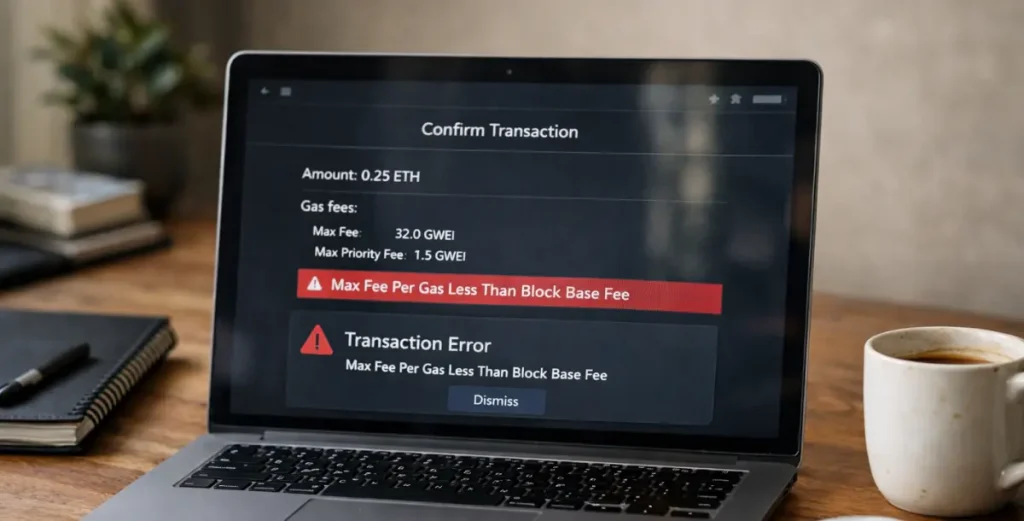
- A transaction is rejected instantly if your Max Fee is lower than the network’s Base Fee. This is typically caused by sudden congestion or lagging wallet estimates.
- To ensure confirmation during volatility, set your Max Fee to at least 2x the current Base Fee.
- Reliable Web3 operations require moving beyond static gas limits. Implementing real-time gas monitoring and automated Replace-by-fee (RBF) logic is essential for maintaining uptime across 200+ networks.
What Does the Error Mean?
You submitted an Ethereum transaction and received a “max fee per gas less than block base fee” error. This error is more common than you might think, especially during periods of network congestion.
In fact, underpriced gas frequently causes failed transactions across Ethereum mainnet, testnets, and local forks. The solution relies entirely on applying the correct code remedy.
How Ethereum Gas Fees Work After EIP-1559
To fix the error, you need to understand how Ethereum’s fee model changed with the EIP-1559 upgrade. This fundamentally restructured how users pay for transactions using two main components:
-
What Is the Block Base Fee?
The base fee is the minimum price per unit of gas required for a transaction to be included in the next block. Unlike the old model where users bid freely, the base fee adjusts automatically based on network demand.
Here’s how it works:
- When blocks are more than 50% full, the base fee increases for the next block (by up to 12.5%)
- When blocks are less than 50% full, the base fee decreases
- The base fee is burned—permanently removed from circulation
When demand spikes, the base fee climbs to manage congestion and ensure the network doesn’t get overwhelmed.
-
What Is Max Fee Per Gas?
The max fee per gas is the absolute limit you will pay per unit of gas. Your transaction will never exceed this cost, regardless of network conditions.
Critical rule: Your max fee per gas must be equal to or greater than the current base fee, or your transaction gets rejected immediately. If you set your max fee at 30 gwei but the base fee jumps to 35 gwei, the network considers your transaction underpriced and won’t process it.
-
What Is the Priority Fee (Tip)?
The priority fee—sometimes called the “tip”—is what you pay validators to prioritize your transaction. This amount goes directly to the validator who includes your transaction in a block.
The formula looks like this:
Total Gas Fee = Gas Used × (Base Fee + Priority Fee)
Your max fee per gas needs to cover both the base fee and your chosen priority fee. If you want faster confirmation, you increase the priority fee. If you’re not in a rush, you can keep it minimal.
The key takeaway: If Base Fee > Max Fee → Transaction Rejected.
Why the Error Happens
This error occurs when the maximum fee you’ve set is lower than the network’s current base fee.
- Sudden Network Congestion
Base fees spike rapidly during high-demand events like NFT mints, token launches, and market volatility. - Low Wallet Default Settings
Wallet gas estimates often lag. If base fees rise between estimation and confirmation, the transaction fails. - Testnets or Local Forks
Static or hardcoded gas configurations in environments like Hardhat and Anvil fail when actual testnet conditions change. - Stale API Gas Estimates
Cached API data, RPC node latency, and batch processing delays cause outdated gas parameters in programmatic transactions.
How to Fix “Max Fee Per Gas Less Than Block Base Fee”
When you encounter this error, follow these steps to resolve it and get your transaction confirmed.
Step 1: Check the Current Base Fee
Before adjusting anything, verify what the network actually requires right now. Use these tools:
Etherscan Gas Tracker (https://etherscan.io/gastracker)
- Shows real-time base fee and recommended max fees
- Provides “Low,” “Average,” and “High” priority estimates
eth_getBlockByNumber RPC call
- Query your node or public Remote Procedure Call (RPC) endpoint
- Returns baseFeePerGas for the latest block
- Most accurate method for developers
Blocknative Gas Estimator (https://www.blocknative.com/gas-estimator)
- Real-time mempool analysis
- Probability-based estimates for different confirmation speeds
Once you know the current base fee, you can set appropriate parameters.
Step 2: Increase Max Fee Per Gas
The safest approach is to build in a buffer. Use this formula:
Max Fee = (2 × Current Base Fee) + Priority Fee
Why double the base fee? Because the base fee can increase by up to 12.5% per block. If 10 blocks pass before your transaction confirms (roughly 2 minutes), the base fee could theoretically rise by ~100% in extreme cases. Doubling provides a safety margin.
Example calculation:
- Current base fee: 30 gwei
- Desired priority fee: 2 gwei
- Recommended max fee: (2 × 30) + 2 = 62 gwei
This ensures your transaction remains valid even if the base fee continues climbing moderately while you’re waiting for confirmation.
Step 3: Adjust Advanced Settings in MetaMask
If you’re using MetaMask or a similar wallet:
- Click Edit on the gas fee screen
- Select Advanced or Custom
- Manually set:
- Max base fee: Use the doubled figure from Step 2
- Priority fee: Set based on how quickly you need confirmation (1-3 gwei is usually sufficient)
- Alternatively, switch to the Aggressive preset during high congestion
MetaMask’s “Aggressive” setting typically sets max fee at 2-3× the current base fee and adds a higher priority tip, which works well during volatile periods.
Step 4: For Developers—Dynamic Fee Estimation
If you’re building applications or running automated scripts, avoid hardcoded gas values. Implement dynamic fee estimation:
Using ethers.js (v6):
const provider = new ethers.JsonRpcProvider(RPC_URL);
const feeData = await provider.getFeeData();
const tx = {
to: recipient,
value: amount,
maxFeePerGas: feeData.maxFeePerGas * 2n, // Double for safety
maxPriorityFeePerGas: feeData.maxPriorityFeePerGas
};
Key points:
- Call getFeeData() immediately before sending each transaction
- Never reuse gas parameters across multiple transactions in a queue
- For production systems, add retry logic with fee bumping if initial estimates fail
Testnet best practice: Configure dynamic fetching in your Hardhat/Foundry scripts rather than hardcoding values in config files.
How to Prevent This Error in Production Systems
For businesses running exchanges, DeFi protocols, or any system processing regular Ethereum transactions, preventing this error requires infrastructure-level solutions.
-
Implement Real-Time Gas Monitoring
Set up continuous monitoring of:
- Current base fee trends (moving averages, volatility indicators)
- Mempool congestion levels
- Historical patterns for your transaction types
Tools like Blocknative’s Mempool Explorer or custom RPC queries can feed this data into your transaction pipeline.
-
Use Automated Fee Bumping Logic
Build systems that can automatically increase gas fees for pending transactions:
Replace-by-fee (RBF) mechanism:
- Monitor submitted transactions
- If not confirmed within expected timeframe, resubmit with higher fees
- Use the same nonce to replace the original transaction
-
Integrate Gas Estimation APIs
For institutional-grade reliability, integrate specialized gas APIs:
- Blocknative Gas Platform: Real-time estimates with confidence intervals
- EtherScan Gas Oracle: Historical patterns and predictions
- Custom RPC monitoring: Query multiple nodes and aggregate estimates
Never rely on a single data source—cross-reference estimates to catch outliers or stale data.
-
Monitor Mempool Conditions
Track how full the mempool is and adjust fee strategies proactively:
- When mempool depth > 50,000 pending transactions → increase default max fees
- During known high-traffic events (major NFT drops, protocol launches) → pre-emptively raise buffers
- Set alerts for rapid base fee increases (e.g., >30% jump in 5 minutes)
-
Design Retry Mechanisms with Exponential Backoff
For non-critical transactions:
- First attempt: Standard estimation
- If rejected: Wait 30 seconds, increase max fee by 50%, retry
- If rejected again: Wait 60 seconds, double max fee, retry
- After 3 failures: Alert operations team or pause automated processing
This prevents burning through attempts with inadequate fees while avoiding overpayment during temporary spikes.
Understanding Gas Errors Strengthens Your Web3 Foundation
The “max fee per gas less than block base fee” error is Ethereum’s fee market working as designed to prevent spam.
- For Users: Fix this by checking the current base fee, doubling it, adding a priority tip, and resubmitting your transaction.
- For Developers: Prevent this by building dynamic gas estimation and automated retry logic into your pipeline.
Build a Reliable Web3 Infrastructure
If you are building an exchange or DeFi platform, you need infrastructure that handles gas complexity automatically. ChainUp provides enterprise-grade ecosystems designed to accelerate your DeFi integration and simplify high-volume asset movement in complex markets.
Talk to ChainUp to activate your DeFi roadmap and ensure reliable operations across 200+ blockchain networks.
Frequently Asked Questions (FAQs)
Is this the same as an underpriced transaction?
Yes, they’re the same concept. “Max fee per gas less than block base fee” is the technical error message. “Underpriced transaction” is the plain-language description of what happened—you offered less than the network’s minimum required fee.
Why does the base fee change?
The base fee automatically adjusts every block based on how full the previous block was. This mechanism (introduced in EIP-1559) helps the network manage congestion by making high demand more expensive, which naturally reduces transaction volume until blocks return to target capacity.
Can I cancel a failed transaction?
A transaction that fails with this error never enters the blockchain or consumes gas—it’s rejected before processing. You don’t need to cancel it because it never actually started. You simply need to resubmit with a higher max fee.
Does increasing the max fee mean I will overpay?
Not necessarily. You only pay the actual base fee at the time your transaction gets included, plus your priority fee. The max fee is just your upper limit. If you set the max fee at 100 gwei but the transaction confirms when the base fee is 40 gwei with a 2 gwei tip, you pay 42 gwei total—not 100.
What happens if the max fee is too high?
Nothing bad. You’ll pay (base fee + priority fee) regardless of how high you set the max. Setting an extremely high max fee just means you’re willing to pay more if conditions worsen, but you only pay what’s actually required when your transaction confirms. The worst case is overpaying on the priority fee if you set that unnecessarily high.